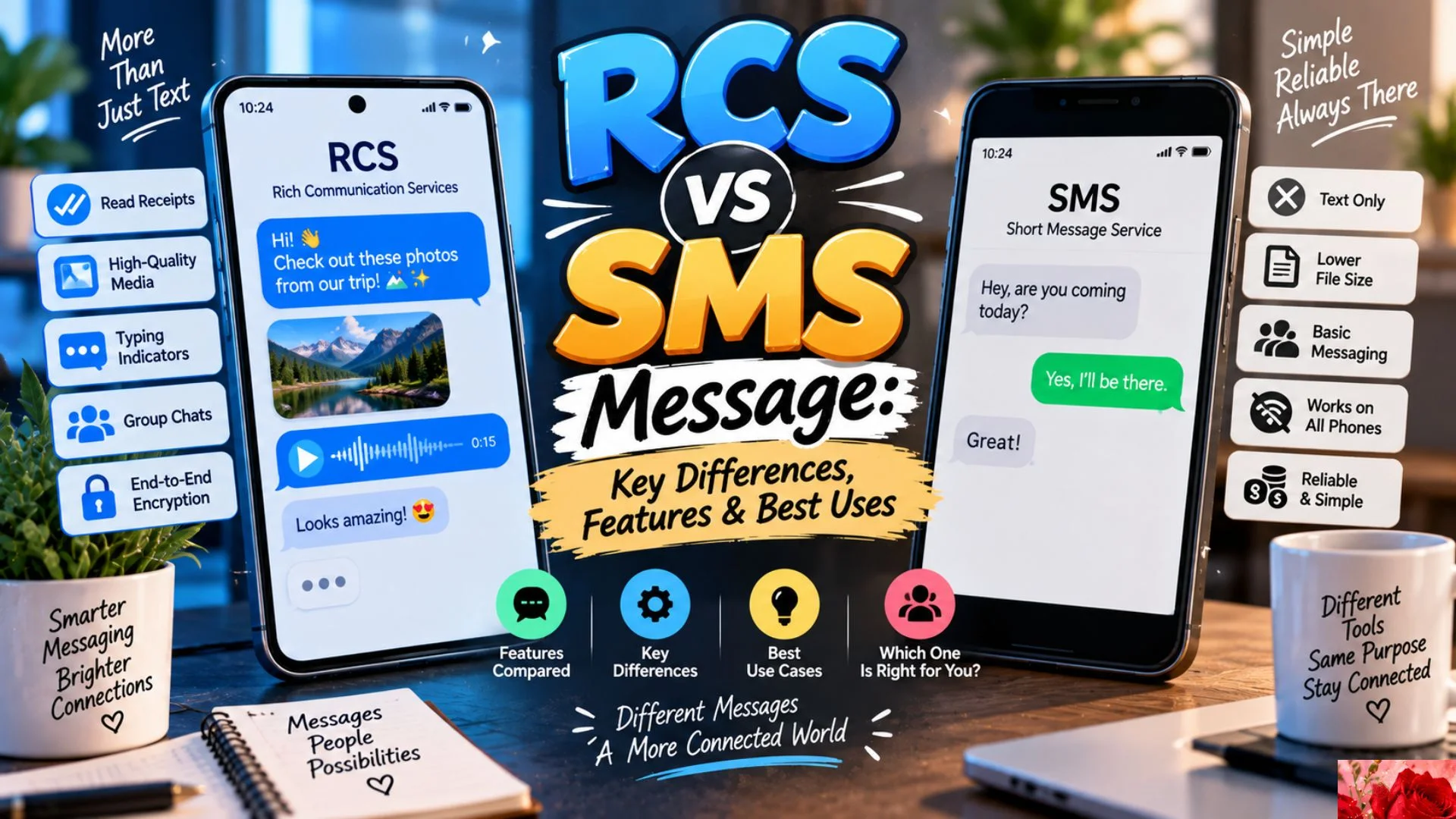
If you have ever wondered about RCS vs SMS Message, you are not alone. Modern phones now support richer messaging features that can make ordinary texting feel outdated. SMS has been around for decades and still works on almost every mobile phone. RCS, however, brings features that look more like a modern chat app. These include high-quality photos, typing indicators, read receipts, reactions, group chats, and larger media sharing. The biggest difference comes down to how much information each service can send and how the conversation works. SMS focuses on simple text messages, while RCS supports a much richer messaging experience.
Understanding RCS vs SMS Message can help you choose the right option for personal conversations, business communication, and everyday texting. RCS can provide a smoother experience when both people have compatible devices and services. SMS remains useful because it works across many networks and devices without requiring the same level of support. In some cases, an RCS conversation may even fall back to SMS when RCS is unavailable. That means you do not always have to choose one permanently. Instead, your phone may use the best available messaging method. In this guide, we will compare RCS and SMS in simple terms. You will learn how they work, how they differ, which features they support, and when each option makes sense.
How Does RCS vs SMS Message Actually Work?
RCS stands for Rich Communication Services and acts as a modern upgrade to traditional texting. It can support photos, videos, reactions, read receipts, typing indicators, and richer group conversations.
SMS stands for Short Message Service and mainly handles plain text. It has strict limits compared with modern internet-based messaging systems.
RCS generally uses mobile data or Wi-Fi. SMS uses the cellular network’s messaging infrastructure. If RCS cannot connect, some phones can send the message as SMS instead.
RCS Message
RCS messaging creates a richer experience than traditional texting. It can make conversations feel closer to modern messaging apps while remaining inside the phone’s default messaging experience.
RCS works best when both participants have compatible RCS support. Features can also vary by device, carrier, region, and messaging service.
- Rich Communication Services
- Rich Messaging
- Advanced Messaging
- Modern Messaging
- Chat Messaging
- Internet Messaging
- Rich Text Chat
- Enhanced Messaging
- Interactive Messaging
- Data Messaging
- IP Messaging
- Connected Messaging
- Mobile Chat
- Rich Chat
- Advanced Texting
- Modern Texting
- Enhanced Texting
- Smart Messaging
- Next Generation Messaging
- Carrier Messaging
- Google Messages Chat
- Chat Features
- Rich Communication
- Media Messaging
- Interactive Chat
- Real Time Messaging
- Online Texting
- Data Based Messaging
- WiFi Messaging
- Mobile Data Messaging
- Multimedia Chat
- High Quality Messaging
- Digital Chat
- Connected Chat
- Feature Rich Messaging
- Modern Mobile Chat
- Rich Mobile Communication
- Advanced Mobile Communication
- Internet Based Texting
- Enhanced Mobile Messaging
- Smart Mobile Chat
- Digital Messaging
SMS Message
SMS remains one of the most widely recognized forms of mobile messaging. Its greatest advantage is simplicity because it does not depend on the same rich feature support as RCS.
An SMS message can travel through cellular networks even when mobile data is unavailable. However, it offers fewer interactive features and limited multimedia capabilities.
- Short Message Service
- Text Message
- Traditional Texting
- Mobile Text
- Cellular Text
- Basic Messaging
- Classic Texting
- Standard Text Message
- Mobile SMS
- Phone Text
- Carrier Text
- Wireless Text
- Plain Text Message
- Basic Mobile Message
- Cellular Messaging
- Traditional Mobile Messaging
- Simple Texting
- Standard SMS
- Text Communication
- Mobile Communication
- Basic Text Communication
- Phone Messaging
- Wireless Messaging
- Carrier Messaging
- Classic Mobile Messaging
- Legacy Texting
- Conventional Texting
- Simple Mobile Chat
- Basic Phone Chat
- Text Based Messaging
- Cellular Communication
- Mobile Text Communication
- Traditional SMS Messaging
- Standard Mobile Texting
- Basic SMS Communication
- Phone Based Messaging
- Simple Text Message
- Network Texting
- Mobile Text Service
- Carrier Based Texting
- Classic SMS Communication
- Traditional Phone Messaging
- Basic Wireless Communication
RCS Chat
RCS chat is designed for conversations that need more than plain text. Depending on the implementation, users can see typing indicators, delivery information, read receipts, reactions, and shared media.
This makes RCS useful for conversations where visual content and interaction matter. It can also improve group conversations compared with traditional SMS.
- RCS Chat
- Rich Chat
- Chat Feature
- Typing Indicator
- Read Receipt
- Delivery Receipt
- Message Reaction
- Group Chat
- Media Sharing
- Photo Sharing
- Video Sharing
- File Sharing
- Location Sharing
- Contact Sharing
- Emoji Reaction
- Message Reply
- Chat Status
- Online Chat
- Interactive Chat
- Rich Conversation
- Modern Conversation
- Digital Conversation
- Connected Conversation
- Multimedia Chat
- Real Time Chat
- Internet Chat
- Mobile Chat
- Smart Chat
- Enhanced Chat
- Rich Conversation Service
- Chat Experience
- Interactive Messaging
- Advanced Chat
- Mobile Conversation
- Data Chat
- Connected Messaging
- Rich Mobile Chat
- Modern Chat Service
- Enhanced Conversation
- Digital Mobile Chat
- Feature Rich Chat
- Advanced Mobile Chat
SMS Text
SMS texting focuses on straightforward communication. It works especially well when you need to send a quick reminder, short update, verification code, or simple message.
Because SMS has broad compatibility, it remains important even as richer messaging services become more common.
- SMS Text
- Text Message
- Text Alert
- Text Reminder
- Verification Text
- Security Text
- Appointment Text
- Delivery Text
- Service Text
- Notification Text
- Mobile Alert
- Phone Alert
- Carrier Alert
- Text Update
- Text Notification
- Short Text
- Quick Text
- Basic Text
- Plain Text
- Mobile Notice
- SMS Alert
- SMS Notification
- SMS Reminder
- SMS Code
- Verification Message
- Authentication Message
- Security Code
- Login Code
- One Time Code
- Appointment Reminder
- Delivery Alert
- Service Notification
- Account Alert
- Emergency Text
- Business Text
- Customer Text
- Marketing Text
- Transactional Text
- Automated Text
- Carrier Message
- Mobile Notification
- Text Communication
RCS vs SMS Message Features
The clearest difference between RCS and SMS appears in their available features. RCS can support richer conversations, while SMS focuses on dependable text delivery.
RCS can provide better media sharing and interactive tools. SMS remains valuable for simple communication and broad compatibility.
- Rich Messaging Features
- Chat Features
- Read Receipts
- Typing Indicators
- Message Reactions
- Group Conversations
- High Quality Images
- High Quality Video
- File Sharing
- Location Sharing
- Contact Sharing
- Message Replies
- Interactive Buttons
- Suggested Replies
- Rich Cards
- Business Profiles
- Brand Messaging
- Media Attachments
- Large Media Files
- Conversation Status
- Delivery Status
- Read Status
- Typing Status
- Emoji Reactions
- Group Messaging
- Multimedia Messaging
- Interactive Content
- Rich Content
- Chat Notifications
- Smart Replies
- Business Chat
- Customer Messaging
- Digital Engagement
- Interactive Communication
- Mobile Engagement
- Rich Conversations
- Modern Texting
- Enhanced Communication
- Data Messaging
- Internet Messaging
- Connected Communication
- Advanced Messaging
RCS Messaging
RCS messaging can be especially useful when a conversation involves photos, videos, documents, or interactive content. It provides more flexibility than traditional SMS.
However, RCS is not identical on every phone. Availability can depend on the messaging app, device, carrier, region, and network connection.
- RCS Messaging
- Rich Communication Services
- Advanced Messaging
- Rich Text Messaging
- Internet Messaging
- Chat Messaging
- Mobile RCS
- RCS Chat
- RCS Communication
- Rich Mobile Messaging
- Enhanced Mobile Messaging
- Interactive Messaging
- Multimedia Messaging
- Data Messaging
- IP Messaging
- Modern Messaging
- Smart Messaging
- Connected Messaging
- Digital Messaging
- Rich Chat
- Advanced Chat
- Modern Chat
- Enhanced Chat
- Mobile Chat
- Online Messaging
- WiFi Messaging
- Data Based Chat
- Internet Chat
- Rich Communication
- Digital Communication
- Mobile Communication
- Interactive Chat
- Multimedia Chat
- Connected Chat
- Feature Rich Messaging
- Advanced Texting
- Modern Texting
- Enhanced Texting
- Smart Texting
- Rich Mobile Communication
- Next Generation Messaging
- Carrier RCS
- Business RCS
SMS Messaging
SMS messaging remains useful because of its simplicity and reach. A recipient does not need a feature-rich chat environment to receive a standard SMS.
That makes SMS particularly practical for alerts, authentication codes, reminders, and other short communications.
- SMS Messaging
- Short Message Service
- Traditional Messaging
- Mobile Messaging
- Text Messaging
- Cellular Messaging
- Basic Messaging
- Classic Messaging
- Standard Messaging
- Phone Messaging
- Wireless Messaging
- Carrier Messaging
- Text Communication
- Mobile Texting
- SMS Texting
- Plain Text Messaging
- Simple Messaging
- Legacy Messaging
- Conventional Messaging
- Standard Texting
- Mobile Communication
- Cellular Communication
- Wireless Communication
- Carrier Communication
- Phone Communication
- Basic Texting
- Traditional Texting
- Classic Texting
- SMS Communication
- Mobile SMS
- SMS Service
- Text Service
- Mobile Text Service
- Carrier Text Service
- SMS Notification
- SMS Alert
- SMS Reminder
- SMS Verification
- SMS Authentication
- SMS Code
- Transactional SMS
- Business SMS
- Marketing SMS
RCS vs SMS Message Compatibility
Compatibility is one of the most important points when comparing RCS and SMS. RCS requires compatible support, while SMS has much broader availability across mobile phones.
If an RCS conversation cannot use the service, a compatible messaging system may fall back to SMS. The exact behavior depends on the phone and messaging service.
- RCS Compatibility
- SMS Compatibility
- Device Compatibility
- Phone Compatibility
- Carrier Compatibility
- Network Compatibility
- App Compatibility
- Messaging Compatibility
- RCS Support
- SMS Support
- Chat Support
- Mobile Support
- Carrier Support
- Network Support
- Device Support
- Android Messaging
- Google Messages
- Default Messaging App
- Messaging Service
- Chat Service
- Mobile Network
- Cellular Network
- Data Connection
- WiFi Connection
- Mobile Data
- Internet Connection
- RCS Availability
- SMS Availability
- Chat Availability
- Messaging Availability
- Carrier Service
- Network Service
- Mobile Service
- Phone Service
- Communication Service
- Cross Device Messaging
- Cross Network Messaging
- Message Fallback
- SMS Fallback
- RCS Fallback
- Compatible Device
- Supported Device
- Supported Network
- Supported Carrier
- Supported Messaging App
RCS Message Delivery
RCS can provide more detailed delivery information than traditional SMS in supported conversations. Users may see indicators showing whether a message was delivered or read.
These features can make conversations easier to follow. Still, delivery behavior can vary based on network conditions and messaging settings.
- RCS Delivery
- Message Delivery
- Delivery Status
- Read Status
- Read Receipt
- Delivery Receipt
- Typing Status
- Message Sent
- Message Delivered
- Message Read
- Chat Status
- Delivery Indicator
- Read Indicator
- Typing Indicator
- Conversation Status
- Message Status
- Chat Indicator
- Delivery Confirmation
- Read Confirmation
- Message Confirmation
- Chat Confirmation
- Online Status
- Conversation Activity
- Message Activity
- Messaging Status
- RCS Status
- RCS Delivery Status
- RCS Read Receipt
- RCS Chat Status
- Rich Message Delivery
- Rich Chat Delivery
- Mobile Delivery
- Digital Delivery
- Internet Delivery
- Data Delivery
- Connected Delivery
- Message Tracking
- Conversation Tracking
- Chat Updates
- Delivery Updates
- Read Updates
- Message Notifications
- Chat Notifications
- Communication Status
- Mobile Chat Status
- Messaging Indicators
SMS Delivery
SMS delivery is simpler than RCS delivery. Depending on the carrier and phone, you may receive limited information about whether a text reached the recipient.
That simplicity can be useful, but it gives users fewer interactive signals. SMS also does not provide the same rich chat experience.
- SMS Delivery
- Text Delivery
- Message Sent
- Message Delivered
- Delivery Report
- SMS Report
- Text Report
- Carrier Delivery
- Network Delivery
- Mobile Delivery
- Cellular Delivery
- SMS Status
- Text Status
- Message Status
- Delivery Status
- SMS Confirmation
- Text Confirmation
- Carrier Confirmation
- Network Confirmation
- Message Receipt
- Text Receipt
- SMS Receipt
- Mobile Receipt
- Cellular Receipt
- Message Notification
- SMS Notification
- Text Notification
- Delivery Notification
- Carrier Notification
- Network Notification
- Phone Notification
- Mobile Message Status
- Text Message Status
- SMS Message Status
- Standard Message Status
- Traditional Message Status
- Basic Delivery
- Simple Delivery
- Carrier Based Delivery
- Wireless Delivery
- SMS Communication
- Text Communication
- Mobile Communication
RCS Media Sharing
One major advantage of RCS is richer media sharing. Supported conversations can handle photos, videos, files, locations, and other content more naturally than basic SMS.
This makes RCS useful for personal conversations and businesses that need to communicate visually. Quality and size limits can still depend on the service.
- Photo Sharing
- Video Sharing
- Image Sharing
- File Sharing
- Document Sharing
- Location Sharing
- Contact Sharing
- Media Attachments
- High Quality Images
- High Quality Videos
- Rich Media
- Multimedia Messaging
- Media Messaging
- Photo Messaging
- Video Messaging
- File Messaging
- Document Messaging
- Location Messaging
- Contact Messaging
- Visual Messaging
- Digital Media Sharing
- Mobile Media Sharing
- Chat Media
- Rich Content
- Interactive Media
- Shared Photos
- Shared Videos
- Shared Files
- Shared Locations
- Shared Contacts
- Media Uploads
- Media Downloads
- Image Attachments
- Video Attachments
- File Attachments
- Document Attachments
- Location Attachments
- Contact Attachments
- Rich Attachments
- Chat Attachments
- Mobile Attachments
- RCS Media
- Rich Communication Media
SMS Media
SMS was designed primarily for short text rather than modern multimedia communication. Some phones may combine SMS with other messaging technologies, but standard SMS itself has limited media capabilities.
This distinction matters when deciding whether a message should contain simple text or richer visual content.
- SMS Text
- Plain Text
- Short Text
- Text Message
- Basic Message
- Mobile Text
- Cellular Text
- Text Alert
- Text Notification
- Text Reminder
- Text Update
- SMS Notification
- SMS Alert
- SMS Reminder
- SMS Code
- SMS Verification
- SMS Authentication
- Security Text
- Business Text
- Customer Text
- Marketing Text
- Transactional Text
- Automated Text
- Service Text
- Appointment Text
- Delivery Text
- Account Text
- Emergency Text
- Information Text
- Status Text
- Confirmation Text
- Notification Message
- Reminder Message
- Verification Message
- Authentication Message
- Security Message
- Service Message
- Business Message
- Customer Message
- Marketing Message
- Transactional Message
- Automated Message
RCS Business Messaging
RCS can provide businesses with more interactive ways to communicate with customers. Depending on the implementation, companies may use rich cards, images, buttons, suggested replies, and branded conversations.
These features can make customer communication easier to understand. They can also reduce the need for customers to switch between different apps.
- Business Messaging
- RCS Business Messaging
- Customer Messaging
- Brand Messaging
- Rich Business Chat
- Business Chat
- Customer Chat
- Interactive Business Messaging
- Rich Cards
- Suggested Replies
- Action Buttons
- Business Profiles
- Branded Messaging
- Rich Media Messaging
- Product Messaging
- Service Messaging
- Customer Support Chat
- Appointment Messaging
- Booking Messaging
- Order Messaging
- Delivery Messaging
- Transactional Messaging
- Marketing Messaging
- Promotional Messaging
- Customer Notifications
- Business Notifications
- Rich Notifications
- Interactive Notifications
- Retail Messaging
- Commerce Messaging
- Mobile Commerce
- Customer Engagement
- Digital Engagement
- Brand Engagement
- Interactive Communication
- Business Communication
- Customer Communication
- Service Communication
- Automated Messaging
- Conversational Messaging
- Business Chat Features
- Rich Customer Experience
- Digital Customer Service
RCS vs SMS Message Security
Security and privacy deserve careful attention when comparing messaging technologies. RCS and SMS do not automatically provide identical security features.
Some RCS implementations can support stronger protections than traditional SMS. However, users should check the messaging service and device because security features can vary.
- RCS Security
- SMS Security
- Message Security
- Mobile Security
- Messaging Privacy
- Chat Privacy
- Data Privacy
- Communication Privacy
- Secure Messaging
- Message Protection
- Data Protection
- Account Protection
- Device Security
- Network Security
- Transport Security
- Encryption
- End To End Encryption
- Chat Encryption
- Message Encryption
- Secure Chat
- Private Chat
- Protected Messaging
- Secure Communication
- Private Communication
- Mobile Privacy
- Digital Privacy
- Conversation Privacy
- RCS Privacy
- SMS Privacy
- Messaging Controls
- Privacy Controls
- Security Settings
- Chat Settings
- Message Settings
- Account Settings
- Device Settings
- Data Controls
- Privacy Options
- Security Options
- Communication Security
- Mobile Communication Security
- Messaging Protection
- Digital Communication Security
RCS vs SMS Message Costs
For many users, the cost difference depends on their mobile plan and how the messaging service operates. RCS generally uses Wi-Fi or mobile data, while SMS normally relies on a cellular messaging service.
A Wi-Fi connection may allow RCS messages without consuming SMS allowances. However, mobile data charges can apply depending on the user’s plan.
- RCS Cost
- SMS Cost
- Messaging Cost
- Texting Cost
- Data Cost
- Mobile Data
- WiFi Messaging
- Carrier Messaging
- SMS Charges
- Text Charges
- Messaging Charges
- Data Usage
- Mobile Data Usage
- Network Usage
- Carrier Plan
- Mobile Plan
- Texting Plan
- SMS Plan
- Data Plan
- Unlimited Texting
- Unlimited Messaging
- Unlimited Data
- Message Allowance
- SMS Allowance
- Data Allowance
- Carrier Rates
- Messaging Rates
- Text Message Rates
- SMS Pricing
- RCS Pricing
- Communication Costs
- Mobile Communication Costs
- Business Messaging Costs
- Customer Messaging Costs
- Transactional Messaging Costs
- Marketing Messaging Costs
- Data Charges
- Carrier Charges
- Network Charges
- Roaming Charges
- International Messaging
- International SMS
- International RCS
- Mobile Roaming
- Messaging Plan
- Communication Plan
- Texting Service
RCS vs SMS Message Use Cases
Choosing between RCS and SMS becomes easier when you consider the purpose of your message. RCS is better suited to richer conversations, while SMS remains practical for simple and widely compatible communication.
Neither service is automatically better in every situation. The right choice depends on the recipient, device, network, message type, and available features.
- Personal Messaging
- Family Messaging
- Friend Messaging
- Group Messaging
- Business Messaging
- Customer Messaging
- Appointment Reminders
- Delivery Updates
- Verification Codes
- Security Alerts
- Account Alerts
- Order Updates
- Booking Updates
- Customer Support
- Marketing Messages
- Promotional Messages
- Transactional Messages
- Emergency Alerts
- Travel Updates
- Event Reminders
- Event Invitations
- Service Notifications
- Payment Notifications
- Banking Alerts
- Shopping Notifications
- Retail Messaging
- Healthcare Messaging
- Restaurant Messaging
- Delivery Messaging
- Location Sharing
- Photo Sharing
- Video Sharing
- File Sharing
- Document Sharing
- Contact Sharing
- Rich Media Chat
- Simple Texting
- Quick Texting
- Automated Messaging
- Conversational Messaging
- Mobile Communication
- Digital Communication
- Customer Engagement
Why RCS vs SMS Message Matters Today
The difference between RCS and SMS has become more noticeable as smartphones have become more capable. People now expect messaging services to support photos, reactions, typing indicators, group conversations, and interactive content.
RCS attempts to bring some of those expectations into the standard messaging experience. SMS, meanwhile, continues to offer an important advantage: simplicity and broad compatibility.
For everyday users, RCS can be a better choice when both participants have support for its richer features. SMS remains useful when compatibility matters most. It also works well for short alerts, verification messages, reminders, and basic communication.
Businesses should consider the audience before choosing a messaging channel. RCS can create a more engaging customer experience, while SMS can reach a wider range of mobile users. In many cases, the strongest strategy uses both.
Which Is Better for Everyday Texting?
For everyday conversations, RCS usually provides more features than SMS. It can make conversations more interactive with read receipts, typing indicators, reactions, media sharing, and richer group chats.
However, SMS still has an important role. It can work when RCS is unavailable or unsupported, which makes it a dependable fallback for many users. Your phone may automatically switch between messaging methods depending on the situation. Therefore, you do not always need to make the choice manually.
Should You Use RCS or SMS?
Use RCS when you want a modern chat experience and both people have compatible support. It works particularly well for photos, videos, group conversations, reactions, and interactive business communication.
Use SMS when you need broad compatibility or simple text communication. SMS remains useful for verification codes, reminders, alerts, and basic notifications. If your phone supports RCS, keeping it enabled can give you access to richer conversations without removing SMS as a fallback option.
Frequently Asked Questions
Is RCS better than SMS?
RCS offers more messaging features than traditional SMS. It can support richer media, reactions, typing indicators, read receipts, and improved group conversations.
SMS remains useful because it has broader compatibility. It also works well for simple alerts and short text communication.
Does RCS use Wi-Fi or mobile data?
RCS can use Wi-Fi or mobile data for messaging. This differs from traditional SMS, which uses cellular network messaging infrastructure.
Your exact experience depends on your phone, carrier, messaging app, and connection.
Can RCS messages turn into SMS?
Yes, some messaging systems can fall back to SMS when RCS is unavailable. This can happen when the recipient does not support RCS or when the RCS connection cannot be used.
The exact fallback behavior depends on your device and messaging settings.
Does RCS have read receipts?
RCS can support read receipts when the feature is available and enabled. It can also provide typing indicators and delivery information.
SMS generally does not offer the same rich chat-status experience.
Can RCS send photos and videos?
Yes, RCS supports richer media sharing than traditional SMS. Depending on the service, users can share photos, videos, files, locations, and other content.
Media quality and size limits can vary between services.
Is SMS still useful?
Yes. SMS remains useful for simple communication, verification codes, alerts, reminders, and situations where broad compatibility matters.
It does not require the same rich messaging support as RCS.
Does RCS cost money?
RCS typically uses mobile data or Wi-Fi rather than an SMS message allowance. Your carrier may still apply data or other charges depending on your plan.
Check your mobile plan if you are concerned about data usage or roaming costs.
Can iPhone and Android users use RCS?
RCS support between different platforms has improved, but the available features depend on the devices, operating systems, carriers, and messaging services involved.
Some advanced features may not work identically across platforms. Therefore, compatibility should be checked for the specific devices involved.
Conclusion
Understanding RCS vs SMS Message makes it easier to choose the right communication method. RCS provides a richer experience with features such as media sharing, reactions, typing indicators, and read receipts. SMS remains valuable because it offers simple and widely compatible text communication. For modern conversations, RCS can provide a more engaging experience when supported. For alerts, verification codes, and basic messages, SMS remains practical. The good news is that many phones can use both technologies. Rather than treating them as competing services, think of RCS and SMS as complementary tools for different messaging needs.

Ethan Brooks is a content writer specializing in messages, wishes and modern communication trends. He creates simple, engaging, and relatable content that helps people express their thoughts and emotions in the best way possible.